
Getting into an online casino should be simple, but it is worth taking a moment to check that you are using the right website and protecting your account. This guide explains the Magic Win login process for players in the United Kingdom, what to do if access fails, and which account and payment details to check before playing. Casino features and availability can change, so confirm current terms directly with the operator.
What to check before logging in
Start by navigating to Magic Win through a trusted source, such as a saved bookmark you created after verifying the official address. Avoid sponsored links, messages, or social posts that promise an unusually large reward. A convincing-looking copycat site can collect passwords and payment information.
UK players should also check whether the casino is currently authorised to offer its services in Great Britain. The UK Gambling Commission provides a public register of licensed operators. Do not assume that a brand name, a familiar logo, or a working login page proves that a site holds the appropriate licence. Check the operator’s legal name and licence details, and make sure they match the regulator’s records.
If the site is available to you and you have an account, look for the login link, usually positioned near the top of the homepage. The exact layout may vary between desktop and mobile. You will generally need the email address or username associated with the account and your password.
Magic Win login: step by step
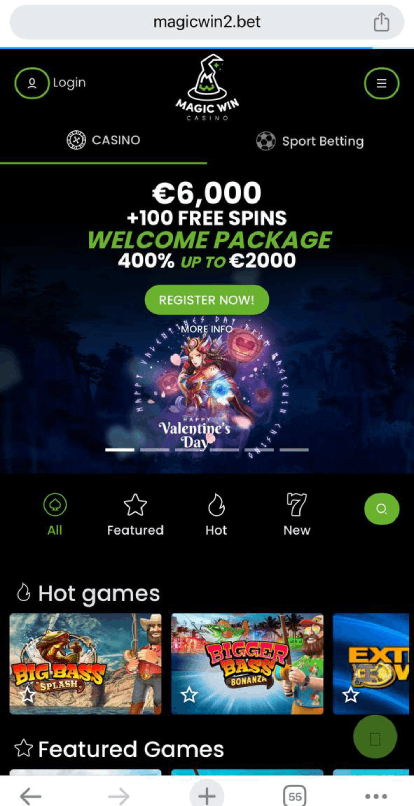
- Open the verified website. Check the spelling of the address and look for a secure connection in your browser. A padlock alone does not confirm that a casino is trustworthy, so verify the operator separately.
- Select “Log in” or “Sign in”. This should open a form for your account credentials.
- Enter your registered details. Check that your email address or username is correct, and watch for accidental spaces or capitalisation issues.
- Submit the form once. If the page takes time to respond, wait before trying again to avoid repeated failed attempts or duplicate actions.
- Complete any requested security check. The casino may ask for a verification code or another authentication step, especially on a new device.
- Review your account status. Before depositing or playing, check any messages, verification requests, limits, and account restrictions.
Do not save your password on a shared computer. On a personal device, use a unique password and a reputable password manager. If the casino offers additional account security, enable it. Never share a one-time code with someone claiming to be support: legitimate staff should not need your password or authentication code.
If you cannot access your account
First, check the basics. Confirm that you are on the correct site, that your connection is working, and that the keyboard has not changed language or enabled Caps Lock. If you normally sign in with an email address, try the exact address used when registering rather than a display name.
Forgotten password
Use the password-reset link on the login form. Enter the email address linked to the account and follow the instructions sent to that inbox. Check spam and junk folders, but do not follow a reset link if you did not request it. If the message does not arrive, contact support through the verified website rather than through an unsolicited email or social-media account.
Account locked or verification required
Repeated incorrect attempts can trigger a temporary lock. Stop guessing passwords and follow the site’s recovery process. An account may also require identity or address checks before deposits, withdrawals, or continued play. Provide documents only through the official account area or another secure channel confirmed by the operator. Avoid sending sensitive paperwork to an address supplied by an unverified third party.
For unresolved issues, contact customer support using the details on the verified site. Give a concise description of the error, the approximate time it occurred, and the device and browser you used. Never send your password, full card number, or one-time security code. Keep screenshots free of personal or payment details.
Account safety and responsible play
A successful login is only one part of safe casino use. Before wagering, read the terms for deposits, withdrawals, bonuses, identity checks, and account closure. Confirm the payment methods available to UK customers and check any fees, processing times, and minimum or maximum transaction amounts. Do not deposit money that you need for bills or other essentials.
Set personal limits before you start. UK gambling rules include tools intended to help customers manage gambling, but the options offered can differ between operators. Look for deposit limits, time reminders, reality checks, and self-exclusion controls. If gambling stops feeling like entertainment or begins affecting your finances, relationships, or wellbeing, stop and seek support. In Great Britain, GamCare and the National Gambling Helpline can provide confidential help; current contact details are available from their official services.
Questions and answers
Can I log in to Magic Win from a mobile phone?
If the operator’s site is available in your location, you can usually try its mobile website using a current browser. Use the verified address and avoid installing an app from an unofficial download page. Check that the app, if offered, is published by the operator and is compatible with your device.
Why does the login page keep refreshing?
A browser issue, outdated software, blocked cookies, or a temporary service interruption may prevent the page from working. Try updating the browser, opening a private window, or clearing the site’s cached data. Avoid repeatedly submitting your details. If the problem continues, ask support whether there is a known outage.
What should I do if I receive an unexpected login alert?
Do not click links in the alert until you have checked its legitimacy. Visit the verified website independently, change your password if you suspect unauthorised access, and review account activity. Contact support promptly if you see unknown transactions or changes to your details. If the same password was used elsewhere, change it on those services too.
Does logging in mean I can claim a bonus?
No. Promotions have separate eligibility rules and may not be available to every customer. Read the current terms before opting in, paying in, or wagering. Check minimum deposits, expiry dates, wagering requirements, game restrictions, and withdrawal conditions. A promotional message is not a guarantee of profit, and bonus funds are not the same as withdrawable cash.
Magic Win discount code and casino account
Searches for a Magic Win discount code and casino account may lead to promotion pages or third-party offers. Treat these cautiously. Only enter a code through the casino’s verified website, and read the associated terms before accepting it. If an offer asks for your password, payment card security code, or a fee to unlock a supposed prize, do not proceed. A code does not establish that a casino is licensed or make gambling risk-free.
A practical pre-play checklist
- Verify the website address and check the operator against the relevant UK regulator’s register.
- Use a unique password and never disclose authentication codes.
- Complete required account verification through a secure, official channel;
- Read current bonus, payment, and withdrawal terms before taking action.
- Set a spending limit and a time limit before playing.
- Log out on shared devices and contact support through verified contact details if something looks wrong.
The safest approach to Magic Win login is deliberately unhurried: verify the operator, enter credentials only on the genuine site, and resolve account issues through official support. If you cannot confirm that the service is appropriately licensed and available to you in the UK, do not deposit or provide identity documents. A clear, secure sign-in process matters, but careful checks and responsible limits matter just as much.